






Guide Showing An Example Of How To Claim An Achievement
Achievements – Example
Here is a guide showing an example of how to claim an achievement.
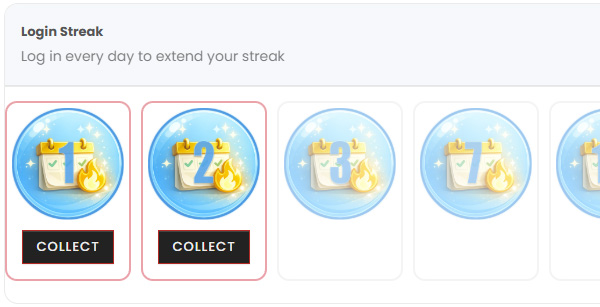
In this example, we use the Login Streak achievement. It is an achievement you earn by logging in daily.
In the image, you can see two boxes with a red border and several levels that are shaded. The shaded levels are achievements that cannot yet be claimed. Each box represents a level, and the requirement to reach that level is shown on the badge, for example 1, 2, 3, or 7.
The first two boxes with a red border can be claimed because we have a two-day login streak (we have logged in for two consecutive days).
To claim the achievement, click Claim. The border will change from red to green.
Once this is done, the reward will be granted to you, often in the form of points or a discount code. This is clearly shown through a star animation.
You will also receive a confirmation email (provided you have not opted out of email notifications).
All different types of achievements (number of orders, unique products, etc.) follow the same pattern. When you reach the different levels, they become available for you to claim and receive your loyalty reward.
If you would like more information about our achievements, you can < click here >.
